Google Sheets to CRM Lead Sync with Automated Outreach
An automation that moves outbound leads from a Google Sheet into a custom CRM the moment a row is written. Once a lead arrives, the whole team works it in the CRM, and a paced outreach workflow emails the leads that are marked ready.
The problem
The client already had a CRM for leads that came in through their website. Outbound prospect leads were collected in a Google Sheet, so there were two places to look for leads and only one of them could track status, notes and assignment. The goal was a single place to manage every lead. The catch was that work already done in the CRM could never be lost if someone edited the sheet, pasted over a row or deleted one.
What I built
A sync that runs on n8n and writes into the same database as the CRM. Whenever a row is added or changed in the sheet, the lead appears in the CRM within moments, tagged with its own source so the team can tell outbound leads from website leads. A scheduled full read every six hours acts as a safety net in case anything is missed. From there, all work happens in the CRM, and the sync never overwrites it. A second workflow sends outreach emails to the leads marked ready, at a steady pace and under a daily cap.
Inside the system
Instant sync with a safety net
A new or edited row reaches the CRM as soon as it is saved in the sheet. Every six hours the workflow also reads the whole sheet, so a missed update corrects itself without anyone noticing.
Duplicate-safe by design
Each lead is matched on its own row ID rather than its email address, because the same business can come back for a different service and should not be blocked. Running the sync again and again creates no duplicates.
Nothing in the CRM is ever lost
The sync only adds and updates, and it never deletes. If a row is removed from the sheet, the lead stays in the CRM. A lead that has already been worked keeps its status, notes and assignment no matter how many times the sync runs.
Row IDs that cannot drift
A small script in the sheet gives every row a permanent ID as soon as the business name is filled in. IDs are never reused, even after rows are deleted, and the ID column is locked so it cannot be edited by accident.
One place to work every lead
Outbound leads arrive in the CRM as new, with their details, source and the sheet's notes carried across exactly as written. The leads list, lead page and analytics all handle the new source, so status, notes, assignment and email history work the same as for website leads.
Paced outreach emails
A ready-to-send checkbox in the sheet marks which leads should be emailed. A separate workflow picks one lead at a time, sends a plain-text email, and waits a few minutes before the next one, stopping at a daily limit so the sending domain is never flooded. Outbound leads are kept out of the automatic welcome emails that website leads receive.
The workflow behind it
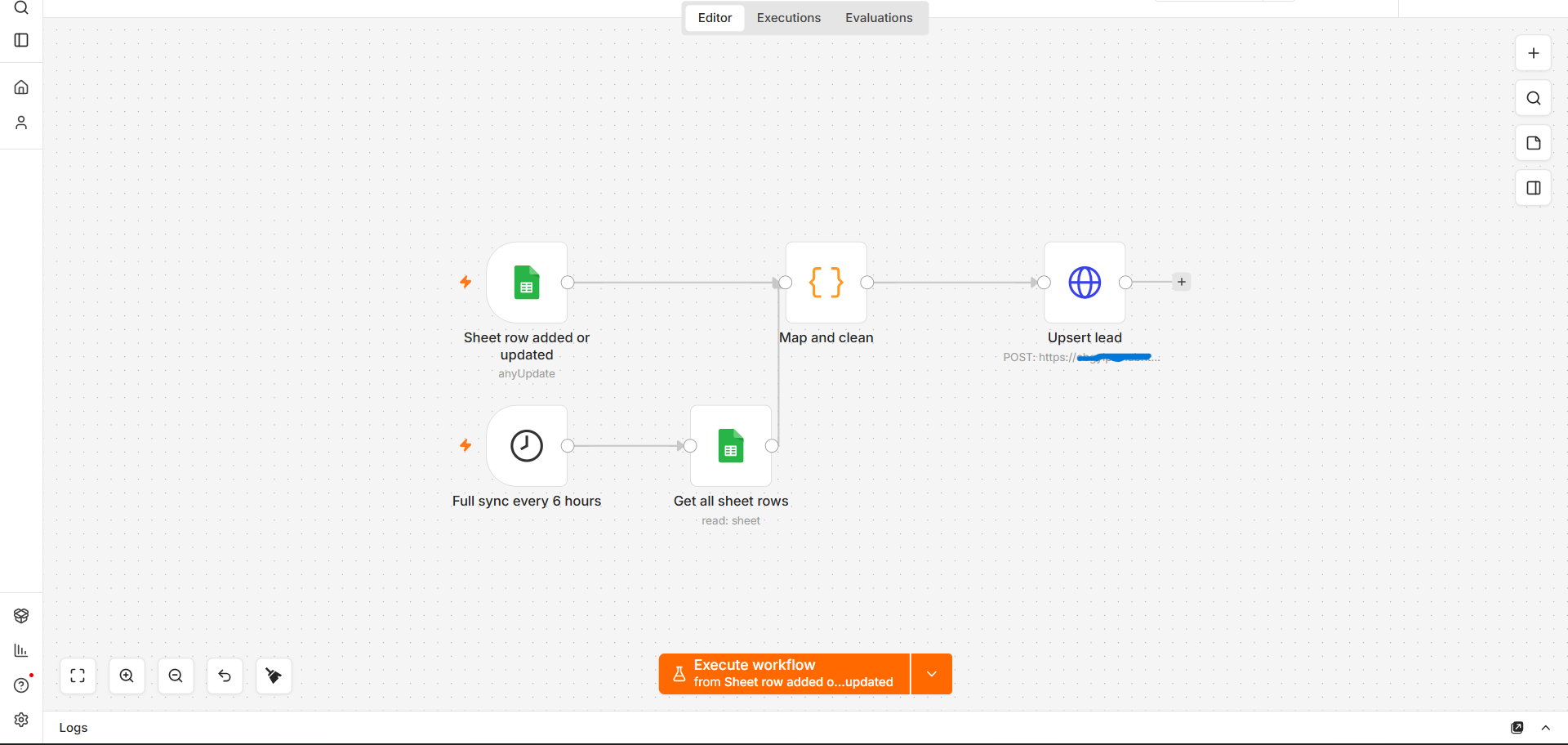
One n8n workflow with two ways in: the sheet trigger for instant updates and the schedule for the full read. Both pass through a single clean-up step before the lead is written to the CRM, so the two paths always behave the same.
Result
Tested end to end: leads written in the sheet arrive in the CRM with every field, re-running the sync creates no duplicates, a lead that has already been handled keeps its status, and outreach emails go out as expected. The team now manages every lead in one place instead of two.